
EV Chronicles #70 - Polestar 3 One Year Ownership Summary

April 10th (2026) marks one year since I picked up my 2026 Polestar 3 with 5 miles on the Odometer. Based on the past year, I would definitely buy another Polestar and/or recommend a Polestar 3 to anyone who is looking for a new luxury SUV EV. To be totally honest, since Polestar is essentially the performance line of the Volvo brand (not 100% accurate, but the best way I can describe their relationship), I am actually considering Volvo branded vehicles as possibilities for our future vehicles. The Volvo EX40 for example is at the top of my list right now for the next car for my wife.
For those of you that know me, you know that I am always looking at cars and trying to figure out what my (or my wife's) next car is going to be. You may also know that in early 2025, I had owned a 2021 Tesla Model Y Long Range for the past 4 years and was looking to get away from the Tesla brand and into a new vehicle. My top choice at the time was actually a Rivian R1S, but unfortunately, the nearest Rivian showroom was a 2 hour drive from my home. This made scheduling a test drive nearly impossible. I also thought that spending over $80k on any new vehicle was just crazy, and perhaps total MADNESS if done without ever test driving the vehicle before paying that kind of money. But there I was, with limited options that I was excited about in the EV space, and so, I was so close to doing it anyway! I was convinced that I was just going to have to keep driving the Tesla....until I discovered the Polestar brand, and in particular, the Polestar 3. It was honestly a car that was priced a bit beyond what I wanted to pay for a new vehicle (~$85k), which is why I really wasn't looking at the brand all that seriously. But in early 2025, Polestar knew that many Tesla owners were looking to distance themselves from the brand and started to put out lease deals that made the Polestar 3 vehicle very price competitive (they offered $20k off of the price of the vehicle for Tesla owners). So I booked a test drive and completely fell in love with the vehicle. I took my wife for a test drive a few days later and the rest is history.
Sidebar - Rivian has opened a new showroom in the King of Prussia Mall in early 2026. I have since taken a Rivian R1S for a test drive and honestly, I LOVE it. I would probably have picked the R1S OVER the Polestar 3 a year ago if I could have test drove their vehicle easily, even though it would have been way more expensive than the Polestar 3. I found the R1S much easier for me to get in and out of and I love the overall larger size of the R1S (although we really don't need a vehicle that large any longer). With that said, I do NOT regret the purchase (technically a Lease with an intention to buy out the lease at the end) of the Polestar 3.
Since 1994, my wife and I have owned/operated 17 different vehicles (one was a long term rental while we worked in Colorado). The Polestar 3 is by far, my favorite car I have ever owned. My Top 5 List of my favorite cars we have owned:
2025 Polestar 3
2021 Tesla Model Y
2020 Mazda CX-5 Turbo
1998 Ford Explorer XLT
2007 Saturn Outlook (LOVED this vehicle. It would have been #2 on my list but it had transmission issues at 65k)
The fact that we take the Polestar 3 everywhere that we go should tell you everything you need to know about what we think about the car. My wife's 2020 Mazda CX-5 Turbo is a great car. I loved driving it when I still owned a 2017 Toyota Highlander, which was a reliable family hauler but nothing special otherwise. But since buying the Tesla in 2021, driving Electric Vehicles has ruined me and I refuse to drive any gas vehicles unless it is an absolute necessity. In addition to being an EV with a ton of power, the Polestar 3 is such a great car to drive. Next, my honest loves and hates of the Polestar 3.
What I LOVE about the Polestar 3
The ride and handling is outstanding. It is still firm, but a bit more comfortable than the Tesla was. The adaptive air suspension makes all the difference in the ride quality. A quality of all EVS is the low center of gravity due to the placement of the battery which makes handling of this vehicle really fantastic.
The Bowers and Wilkins sound system is the best car audio on the planet, hands down. I am no audio expert, but those that are that have experienced it have said so.
The seats might be the most comfortable seats I have ever experienced in any car. Even the second row seats are comfortable.
Noise Cancellation makes the cabin very quiet, even with roof rails on the vehicle causing extra wind noise
The Acceleration is Great
Not as amazing as my Model Y with the performance package add on, but pretty good. 4.8 seconds to go from 0-60 mph is faster than just about every car out there unless that other car is an EV, or any model with "GT" in the Name, or any supercar with a price tag over $100k (there are a few exceptions of course)
Polestar Service Team has been great so far
I had one issue with the onboard AC charger failing. They came and got the car and provided me with a free rental for the 10 days they needed it to address the issue.
I have another service scheduled coming up in a couple of weeks and getting that planned has been pretty easy.
Access to the Tesla Charging Network
When I purchased the Polestar a year ago, this was an important selling point. Not all EV brands had access to the Tesla Charging network. Tesla was just about everywhere and very reliable, others were struggling.
Fast Forward a year, and the proliferation of the EV Charging infrastructure has made the need for Tesla Charger Access much less important. We just drove to the Finger Lakes region for a long weekend. We only used Tesla chargers 2 of the 5 times we stopped to charge, and we could have likely avoided Tesla both of those times without much issue.
Double Edged sword here, because it looks like I will get faster charging at some of the newer DCFC chargers being installed now. Going forward, Tesla Access is nice, but not a game changer.
Things that are good but could be better:
DCFC Charging Rates
Polestar claims the 3 can achieve 250 kW charging rates. I have personally maxed out at 194 kW at nearly all of my DCFC stops. This is mostly a charger issue caused by AMP Limits due to the choice of charging cables on many chargers and not a Polestar 3 issue here in the US.
I found ONE DCFC charger just last weekend where I hit 233 kW. I need to do more testing with this charger (or ones just like it) and determine what that means to my 10-80% charge times. Ionna, Applegreen, and I think Electrify America are now installing new Alpatronic Charging equipment that supports 600 AMPS (maybe more). Tesla chargers for Non-Tesla vehicles and many other chargers max out at 500 AMPS typically, which limits most 400V vehicles to right around 200 kW max charging rates.
I have timed it out and I get about ~30 minutes 10-80% charging speeds, which is adequate, but it is not class leading. This is roughly the same time your see from just about every EVs on the market today
ADAS (Advanced Driver Assist System) is good, but not amazing
I primarily use this and "need" this on our long drives that are mostly on highways, where it does great.
It does what most modern cars do today. Adaptive cruise control and lane centering. This is all that most people need honestly.
Tesla's implementation of this was more confidence inspiring. The Polestar seems to not really anticipate sharp curves well and doesn't seem to go into or come out of these sharp curves confidently. Although with Tesla pushing FSD these days, they have pulled back on Autopilot and their vehicles don't even do this basic stuff now without paying for FSD.
Built in Navigation / Trip Planning
Route Planning works pretty well. It does a solid job of planning out charging stops on long trips.
Prediction of SOC at arrival is generally pretty good. Unfortunately, it doesn't account for the following (all things that my Tesla did a great job of figuring out):
Impact of wind direction and speed - a 15-20 mph headwind can burn upwards of 5-10% more energy for a given drive
Impact of energy needed to precondition the battery. Tesla included this in your estimated arrival SOC values and I just figured ALL EVs did so until I discussed this with my brother who owns 3 different EVs (VW ID.4, Chevy Bolt, and KIA EV9). None of these vehicles, nor the Polestar 3, includes this in the arrival SOC estimate. None of his vehicles deal well with weather either. For the Polestar, I have found it a good idea to account for 6-10% extra for every leg of a trip in really cold temperatures.
Over the Air Updates
I have received several over the air updates since taking ownership. The update process has been simple and straight forward.
The car HAS gotten better with each update. The software HAS gotten much less buggy in the past year.
OTA Updates have discontinued until I get the new CPU upgrade I have been told.
Things that need to get better
Battery Preconditioning is via NAV only
The ONLY way to precondition the battery is to have the very NEXT destination in the NAV set to be any DCFC station. This can be problematic at times and Polestar really needs to add manual preconditioning as an option for owners with future software updates.
Situations where Preconditioning with the NAV only is a problem:
DCFCs are getting installed rapidly. That is great news for EV owners, except when you want to go to one of them shortly after they become active. As I write this, there were several DCFC stations that are on the PA Turnpike for example that were not showing up in the Google Maps Navigation until just last weekend. They had been operational for months.
Want to stop to grab a bite to eat a couple minutes before your planned DCFC charging stop? Well, you cannot put that stop into the NAV if you want your vehicle to correctly precondition. Best to have WAZE on your phone running for the other stops on the way to the DCFC, because it can take upwards of an hour or more to properly precondition a cold battery.
Phantom Drain
Polestar really has a problem here, but the kicker is that the drain doesn't seem to be consistent. I need to study this more, but I easily lose 1-2% almost every day while I am at work (8-10 hours) and another 2-3% at night. While sitting (rarely happens), I could see upwards of 4% in any given 24 hour period. But then there are days that I only lose 1-2%. I don't understand the drivers here.
I have read that the CPU upgrade with the next version of SW might address this. I hope to find out soon.
Phone Connectivity
I want to start by saying that at the end of the day, this is mostly a non-issue for me. It is only an issue when I drive home from work and only if someone would happen to call me during my 20 minute commute home, which rarely happens.
My issue is with phone connectivity is the lack of sound while making/receiving a phone call. I'll make/receive a call and the in-car infotainment system "rings" and once the call connects, my voice and the caller's voice don't go through the mic and speakers in the car.
This is an intermittent issue which I think is tied to me turning on my phone's bluetooth AFTER I get into the car. I might have a unique use case. Because of where I work, I must leave my phone either in my car or in in the lobby of my workplace all day. I chose to leave it in the car most days and I just put it on Airplane mode. I think taking it off Airplane mode AFTER the car is "on", results in the phone connectivity getting messed up. I haven't tested this honestly to determine that this is the cause, but that is what I suspect.
As I stated, at the end of the day, this is mostly a non-issue for me.
Buggy Software
The Software was very buggy during the first several months of ownership.
To be fair, with the OTA updates, the software has gotten more and more stable with each new version that has been installed. My current version of the software has been very stable. I have gone from having to reboot the computer in the car weekly to less than once per month. I had to reboot my Tesla about once every 2 months or so as well.
Minimal Error Messaging when things go wrong
I had an issue recently where my ADAS systems didn't work for about 36 hours. The messaging on the screen wasn't helpful. "Steering Assist Unavailable" Thanks?!, although a true statement, not helpful. I spoke with the support team who recommended a SW reboot which didn't immediately resolve the issue. It would have been nice to be able to get some additional error codes/information from the SW to determine if I was dealing with some sort of Software issue or some sort of hardware failure (like a camera or the radar system).
The issue totally disappeared the next morning after charging the vehicle overnight. So it was likely some sort of weird software issue where something needed to be reset or rebooted and that happened when the car went quiet and was charged overnight.
Not supported by any OBD II Scanning SW yet
Its a new vehicle, I get it. It might take time for them to catch up, but having the ability to read the error codes might be helpful
Plus, the nerd in me just really wants to see more data. I want the OBD II running while I am driving toward a charger and it is preconditioning. I want to see battery temperatures on the way and while its charging.
This is a case where Tesla just gets it. These cars are basically computers on wheels and as such, Tesla has a diagnostic/service mode where the owner can look at a ton of interesting information and error messages for their vehicle. This needs to become the norm for all new vehicles, which would make the OBD II scanners not necessary.
What I do NOT LIKE about the Polestar 3
Ingress/Egress is not easy for someone like me with long legs and ... um, other "large features". The steering wheel placement is the biggest issue here, there just isn't enough room here for my thighs to get under the steering wheel comfortably.
Tesla had an Ingress/Egress mode that was engaged when the car went into park that moved the steering and seat into positions that made Ingress/Egress very easy. I miss that feature.
No Hitch Standard - Hitch Option is Retractable
Technically, there is a hitch option that is a Retractable Hitch. I don't love that design and also (this is a very European thing), it was rather expensive to add on so I opted to not get it installed. I wish there was an after market hitch option like I installed on my other SUVs, but there isn't.
My main use of a 2" hitch is to mount one of my bike racks. I purchased the Roof Rails instead and now just put the bikes on top of the Polestar when needed. As I get older and my strength isn't what it used to be, it is much harder to get the bikes up that high, but for now, I can still manage it. I really prefer the hitch mounted bike racks and might still get a hitch on it someday.
400 Volt Battery System
Many other EVs in this price range have moved to 800V battery architectures. Higher voltage means higher charging speeds on AMP Limited Chargers.
The downside is that Tesla only Supports 400V vehicles
Don't need to get into the details here but the 800V vehicles have to have a special converter built in to work with Tesla chargers, and those converters are often severely limited (some to only 100-150kW at most). Future Tesla charger designs are expected to be able to support 800V - 1000V vehicles.
Less Storage than the Model Y
The space in the Frunk and the Under Floor trunk spaces are just not as large as the Model Y. Hoping they address this somewhat in future versions of this vehicle.
Most of the time, it doesn't matter. On a handful of occasions, where I had 4 people traveling in the car total with all of our stuff for a long weekend or a week in Florida, we could have really used a little bit of extra space (these couple of occasions is when I also could have taken advantage of the extra size of the Rivian R1S). I made it work on one occasion with a roof mounted luggage box, but that really cut down on my range and slowed us down slightly.
Let's get into the Numbers (as of 4/5/2026)
Odometer: 19023 miles
Power Consumed 10,122 kWh
Home - 4769 kWh - 47.1% of overall kWh (Home charging and use of portable Battery)
DCFC - 3482 - 34.4%
Free - 1871 - 18.5% (free hotels, AirBnBs, and Family, and any other Free L2 charging)
Cost of Charging - Total - $2018
Home - $638 - Average Electric Rate: $0.134/kWh
DCFC - $1380 - Average Electric Rate: $0.396/kWh
Gas Car (20 mpg assumed) would have been $3155 worth of gas.
Driving/Energy Statistics
Total:
490 Wh/Mile average based on Total Energy/Miles Driven assuming 92% charging efficiency
Driving
430 Wh/Mile (estimated)
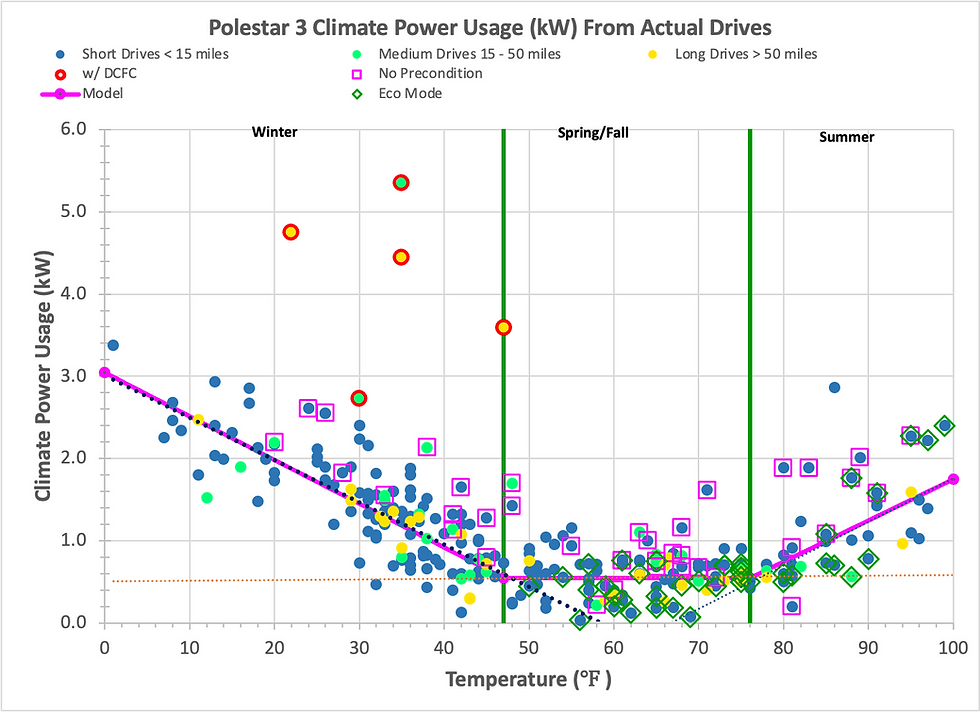
I have computed this numbers from two different methods. First by estimating charging efficiencies and phantom drains and such and backing those out from the total number above. The second method is by looking at the data I have collected for the driving statistics for over 160 drives I have made since mid December. Both methods exclude energy that was used to warm up/cool the car before driving, and phantom drain
This would equate to an average of 255 miles of range on my average drive.
Purchasing a tax free car for sale was a great experience for me. I saved a good amount of money and still got a high-quality vehicle with no issues. https://patriot-autos.net/